If you’re starting out with a fresh install of OS X (10.9 in my example) and are using any development tools, at some point I’m sure you’ll want to add some directories to your system PATH. In short: this allows you to use an application in a specific directory from any other directory – commonly when you’re running commands in Terminal.
To start, we’ll utilize a text editor – in my case I’m using TextMate – but any plain text editor should do. Let’s get to it:
 Let’s first make sure you don’t already have a .bash_profile. In TextMate, go to File > Open. Browse to your home folder (with the house icon) and click “Show Hidden Files”. In your home folder you shouldn’t already see a .bash_profile file. (If you do, then you don’t need to create a new file and can open your file, make changes and skip to step 5.)
 So cancel the open dialog and enter some text into the untitled file currently open. You’re usually entering something like: export PATH=${PATH}:/somedirectory/asubdirectory:/anotherdirectory
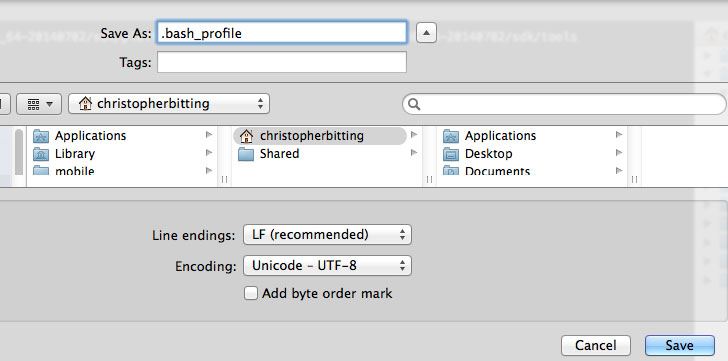
 Now let’s save our new .bash_profile. Go to File > Save As. Browse to your home folder (with the little house icon again). Enter the filename as “.bash_profile” (without quotes).
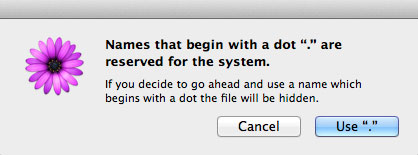
 If you get a message saying “names that begin with a dot are reserved for the system” chose “Use ‘.’”
 That’s it. Now if you already have a terminal open run source ~/.bash_profile (this just give you access to the updated PATH).



 If you’re developing html / javascript applications and want to test locally, many times you will go beyond what local file access (file:///C:/…) in browsers will allow (like XMLHttpRequests, json calls, cross domain access and Access-Control-Allow-Origin restrictions).


 Sometimes it’s cool to debug and test javascript applications in Chrome but you want to read / write to local files. Example: you’re looking to use ajax and do a $.getJSON(‘json/somefile.json’). Chrome by default won’t allow this and will throw an error similar to:
 If you’ve got a
  If you’ve ever wanted to include a ‘Tweet’ button or link but didn’t want to use the popular
  Chris Bitting